
Total VPN Review: Quick Expert Summary
Total VPN is a good add-on VPN. It provides fast speeds, a large server network, and it works with top streaming sites like Netflix, Amazon Prime, and Disney+. It also comes with industry-standard security features, including 256-bit AES encryption, a no-logs policy, and a kill switch. Plus, it provides DNS, IPv6, and WebRTC leak protection.
TotalAV’s VPN is pretty good, but there is room for improvement. The VPN has very basic apps, and it provides poor customer support. Plus, it always leaked my DNS address, and connecting to Hong Kong gave me a US IP address instead of one from Hong Kong.
Total VPN offers an annual plan that costs $1.59 / month. It’s also available as part of TotalAV’s excellent antivirus in its Internet Security and Total Security packages, which offer annual plans for 6 and 8 devices, respectively. Whether you buy the VPN on its own or as part of an antivirus package (which I recommend since it’s a better overall value), your purchase is protected by a 30-day money-back guarantee.
August 2025 update: We downloaded all apps and fully retested the VPN. As a result, we updated images and features available on each of the apps. We also fact-checked the entire review and updated important facts about the VPN’s offerings.
Total VPN Full Review — Good Speeds, Industry Standard Features + More
I spent a week doing extensive testing and research on Total VPN to see how it compares to other top VPNs and whether it’s worth buying.
And my conclusion is that TotalAV’s VPN is a good choice. It works with top sites, its speeds are pretty good, and it has industry-standard security features.
TotalAV’s antivirus is also one of the best antiviruses on the market. So if you want a really good internet security suite that comes with the best antivirus-bundled VPN, TotalAV won’t disappoint you.

Total VPN Plans & Pricing — Very Cheap + Can Be Purchased With TotalAV Antivirus
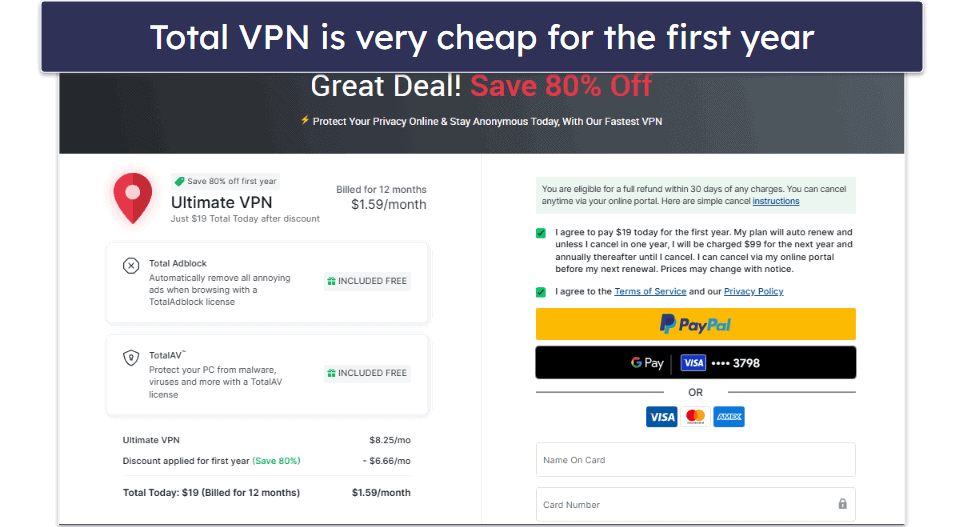
TotalAV’s VPN has one annual plan that starts at $1.59 / month. It includes TotalAV antivirus and Total Adblock free for 1 year. This is really cheap for a VPN, though its renewal costs are 5x higher.
It can also be purchased with TotalAV’s Internet Security plan, which costs $39.00 / year and includes TotalAV’s antivirus plus the VPN for up to 6 devices. You can also get the VPN as part of TotalAV Total Security, which costs $49.00 / year and adds a password manager and support for up to 8 devices.
TotalAV accepts payments by credit cards, Google Pay, and PayPal. I’d like to see TotalAV offer support for cryptocurrency payments, which provide better privacy.
The standalone VPN and the antivirus packages all have a 30-day money-back guarantee, which is on par with other top VPNs and antiviruses.
Total VPN Features — Decent Features in an Intuitive Interface
TotalAV Safe Browsing VPN has industry-standard VPN security features, such as:
- 256-bit AES encryption. This is very strong encryption used by banks and militaries.
- No-logs policy. It doesn’t keep logs of your online activities, such as what websites you visit or what files you download.
- Kill switch. Total VPN only has an advanced kill switch. So, instead of a normal one that disconnects you from the internet if your VPN connection drops, in order to prevent accidental data leaks, the advanced kill switch blocks your connection entirely if the VPN isn’t connected, even if you’ve disconnected on purpose. This is only available through the Windows antivirus app.
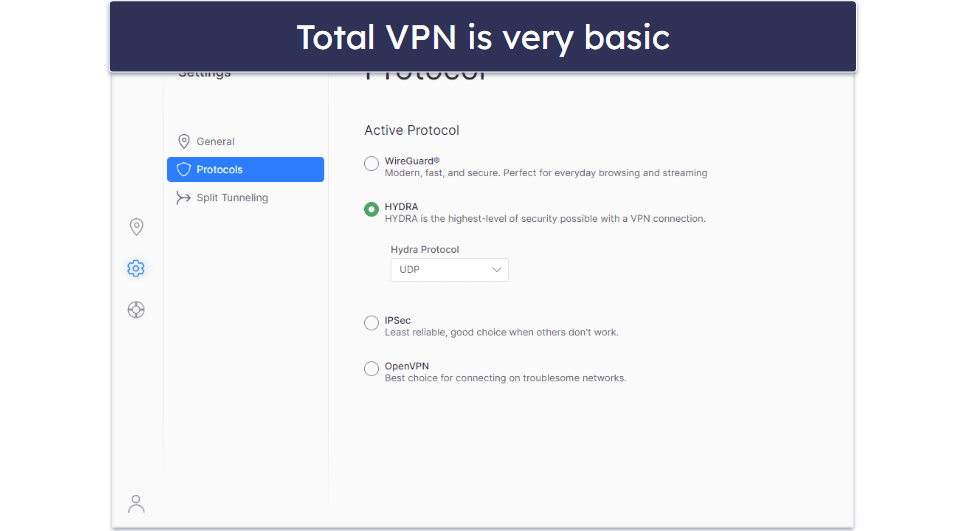
You get access to several VPN protocols: IKEv2/IPSec, OpenVPN, HYDRA, and WireGuard. WireGuard is an increasingly popular protocol since it’s super fast and very secure, so I’m happy to see that Total VPN has it.
TotalAV’s VPN has full leak protection against DNS, IPv6, and WebRTC leaks, and it worked flawlessly in my tests. I ran leak tests in dozens of countries on multiple devices, and I never had any leaks. What I like is that its leak protection applies to all devices, while Bitdefender’s bundled VPN only has WebRTC and IPv6 leak protection on Windows.
This provider is missing extra VPN features, like a standard kill switch, obfuscation, which hides your VPN traffic, an ad blocker, and Multi-hop servers, which are common extras top VPNs like ExpressVPN, Private Internet Access, and Surfshark offer.
However, you get TotalAV’s ad blocker and password manager if you purchase its Total Security plan, and the ad blocker and antivirus are included with the VPN subscription for one year free.
Total Adblock & Total WebShield (Extensions) — Blocks Ads, Trackers & Dangerous Websites
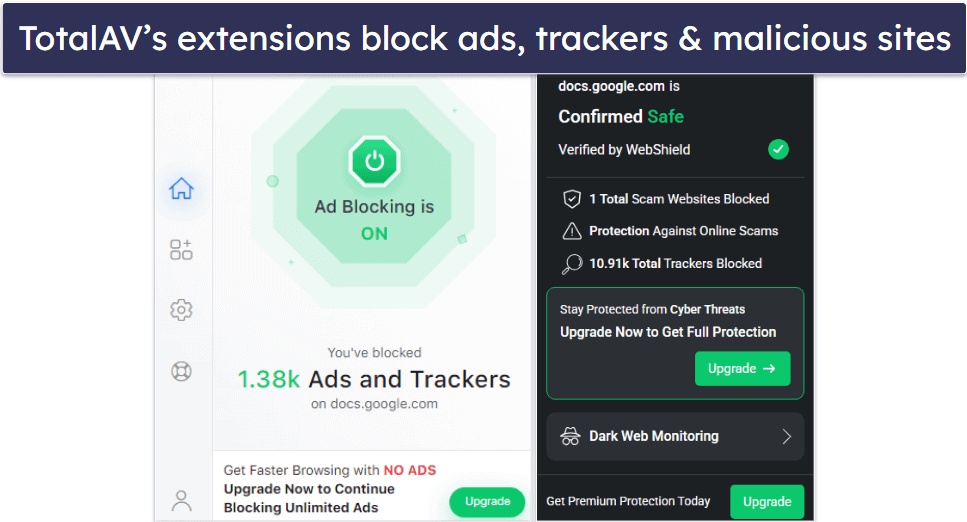
These are extensions for Chrome, Firefox, and Edge that block ads, trackers, and shady sites. Total WebShield also provides dark web monitoring, which alerts you if your emails appear in a data breach.
I tested Total Adblock by visiting some ad-heavy social media pages, and it was able to block most of the annoying pop-up ads and help the pages load faster. And Total WebShield correctly identified and prevented me from visiting several known phishing sites.
Overall, Total Adblock and Total WebShield are really good extensions, and I like that the ad blocker is included free for one year. For comparison, Private Internet Access has one of the best ad, tracker, and malicious website blockers (MACE) and it comes free with each subscription.
Split-Tunneling — Easy to Use and Works Reliably, but Lacks Functionality
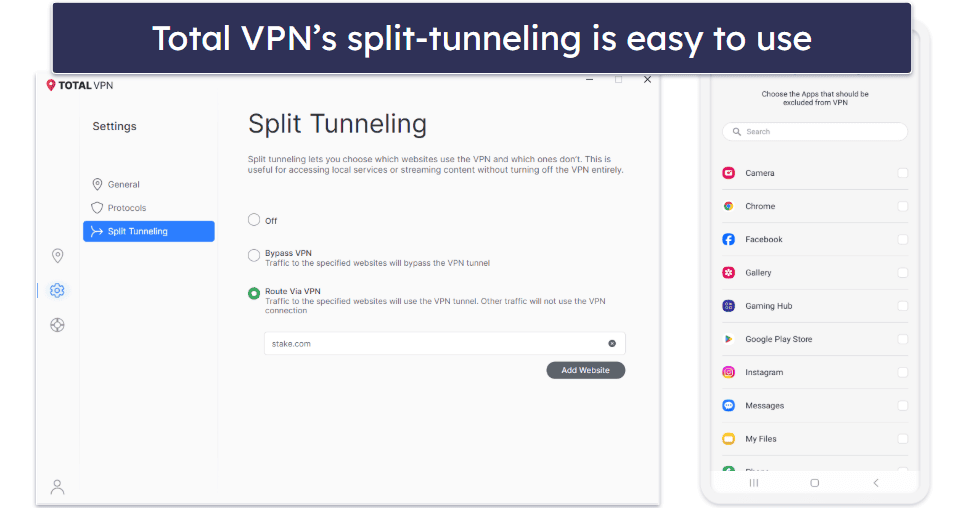
Total VPN comes with split-tunneling on Windows, Android, and iOS, which is pretty good since Surfshark is one of the only VPNs to offer it on iOS, and most don’t offer it on macOS. It lets you choose which sites and apps follow the VPN tunnel (Route via VPN) or use your normal internet connection (Bypass VPN).
It worked well in my tests, and I was able to order food delivery through DoorDash on Android while connected to the VPN.
However, it doesn’t allow it for both apps and sites on all devices. For example, Android can only exclude apps, and iOS can only tunnel sites, though you can choose to include or exclude the chosen sites from the VPN tunnel, which is good.
The main drawback is that it limits you to split-tunneling sites on Windows, and not apps, which is disappointing. Private Internet Access allows both on Windows, and ExpressVPN even has split-tunneling on its router app. But this is still better than other antivirus-bundled VPNs like McAfee Safe Connect, which doesn’t offer split-tunneling at all.
Overall, Total VPN’s split-tunneling tool works well and is simple to set up, but it’s lacking some functionality.
Total VPN Privacy & Security — Doesn’t Collect User Data (But Logs Your IP Address)
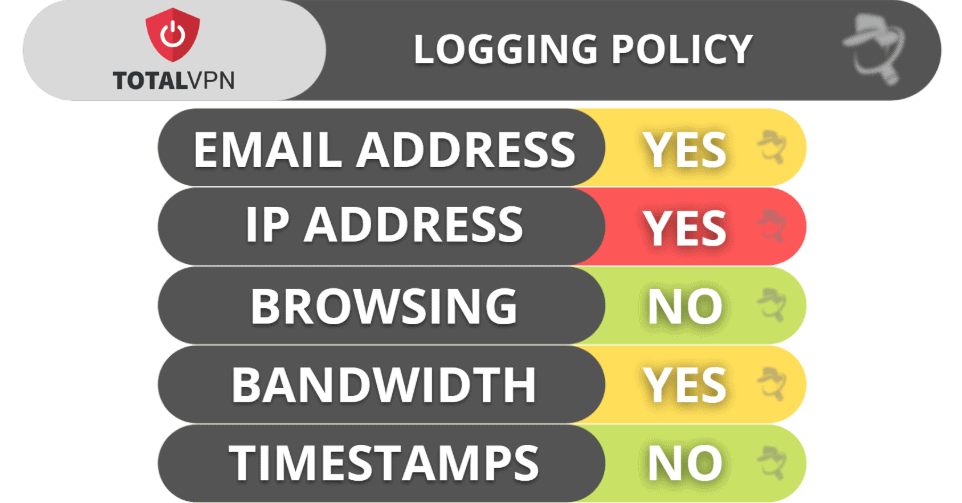
TotalAV’s VPN has a no-logs policy that stops it from collecting user data, like what websites you visit or what files you download, but it does store your IP address. It’s also never undergone an independent audit to verify its claims.
Total AV’s privacy policy states that it logs your IP address — unfortunately, it doesn’t say why it does this. It also logs your email address, but only for communication purposes, and it’s not really out of line with other VPNs — most of them require you to provide your email address when you create an account. And it logs your bandwidth, which it uses for security, network operations, and support.
That said, I think top VPNs like ExpressVPN and Private Internet Access provide better privacy — they don’t log your IP address and have also passed independent security audits.
TotalAV is headquartered in the United Kingdom, which is a member of the 5/9/14 Eyes Alliances, a group of countries that share surveillance data with each other, and has mandatory data retention laws.
Overall, TotalAV’s VPN has decent privacy policies, but a lot of top VPNs offer stronger privacy. Total VPN doesn’t log your internet traffic or what you download, but it logs your IP address and is headquartered in the UK, which isn’t a privacy-friendly country.
Total VPN Speed & Performance — Very Fast Speeds on All Servers
I ran speed tests in all 85 countries where TotalAV’s VPN has servers. The VPN provides fast speeds on nearby and distant servers.
To test its speeds, I first ran a test without being connected to the VPN to get a baseline for my speeds:
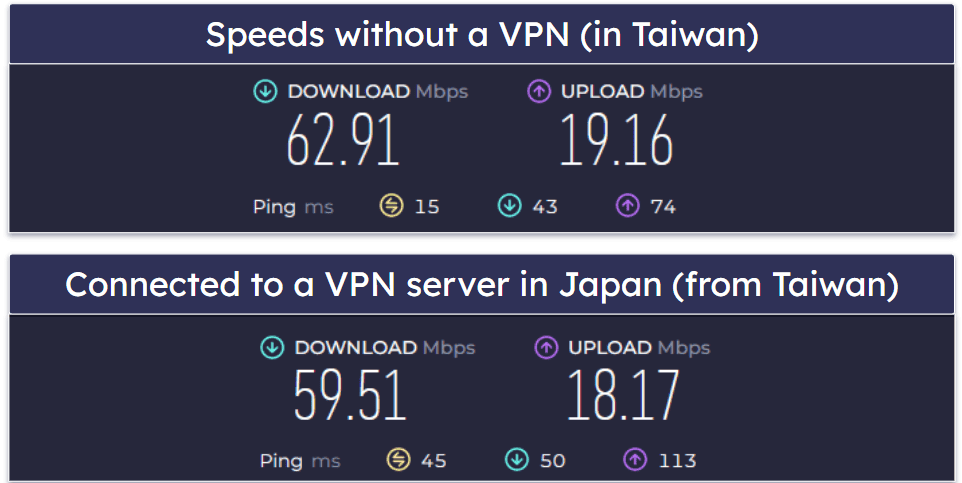
Next, I connected to a nearby VPN server in Japan, and I only experienced a minor drop in speeds, which is very good. Websites and videos still loaded instantly, and I didn’t experience any buffering when watching HD videos on YouTube.
I then connected to a distant server in the US. Some of the sites I visited took a couple of seconds to load. Also, HD videos on YouTube took about 2–3 seconds to load, and there was only minor buffering when I skipped through them.
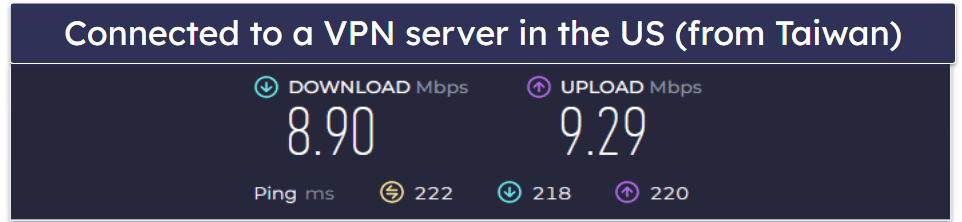
Overall, the speeds are really fast on nearby servers and good on distant servers. Still, I think there are much faster VPNs out there — ExpressVPN, for example, is the fastest VPN on the market and maintains lightning-fast speeds on both local and distant servers.
TotalAV Safe Browsing VPN Servers & IP Addresses — Not the Best Server Coverage
TotalAV’s VPN has servers in 85 countries. This is a pretty small network compared to top standalone VPNs — for example, ExpressVPN has servers in 105 countries, and Private Internet Access has servers in 50 countries.
The VPN also allows P2P traffic on non-US servers. While that’s decent, you still get access to much larger P2P server networks with top competitors like ExpressVPN and CyberGhost VPN.
However, it doesn’t have any specialty servers at all, while most top VPNs offer something extra: Double VPN connections, obfuscated servers, streaming & gaming servers, dedicated IP addresses (IPs that only you use), etc.
Overall, TotalAV’s server network is pretty good, with servers in dozens of countries around the globe. However, it doesn’t have any specialty servers or dedicated IPs.
Total VPN Streaming & Torrenting — Works With All Top Streaming + P2P Services
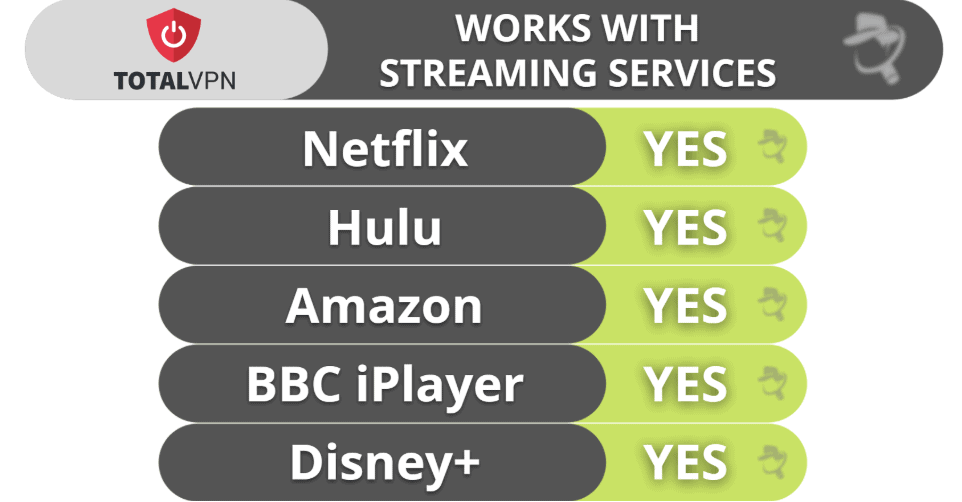
TotalAV’s VPN is great for streaming. It works with most major streaming services, including Netflix, Amazon Prime, Disney+, Hulu, and BBC iPlayer, which is great.
Still, if you only want to use a VPN for streaming, I recommend ExpressVPN instead. It’s the best VPN for streaming in 2026 since it works with 100+ streaming apps (and 10+ Netflix libraries).
Customer support told me it doesn’t support torrenting, but it worked perfectly when I tested 8+ server locations, including Canada, the US, France, Hong Kong, and more. It also works with top torrenting clients, like qBitorrent, Vuze, and Transmission. Norton’s bundled VPN is worse for torrenting as it only has 1 torrenting server in the Netherlands, which can result in much slower speeds if you’re far away.
It also doesn’t have any P2P-friendly features like port forwarding (allows you to connect to more peers for faster download speeds) or SOCKS5 proxy support, which changes your IP address but doesn’t provide encryption for faster speeds. Private Internet Access has both, so it’s my preferred VPN for torrenting.
Overall, TotalAV’s VPN is great for streaming and is solid for torrenting. It works with most top streaming sites and works well for torrenting, though it’s missing some extras.
Total VPN Bypassing Censorship — It Won’t Bypass Any Censorship
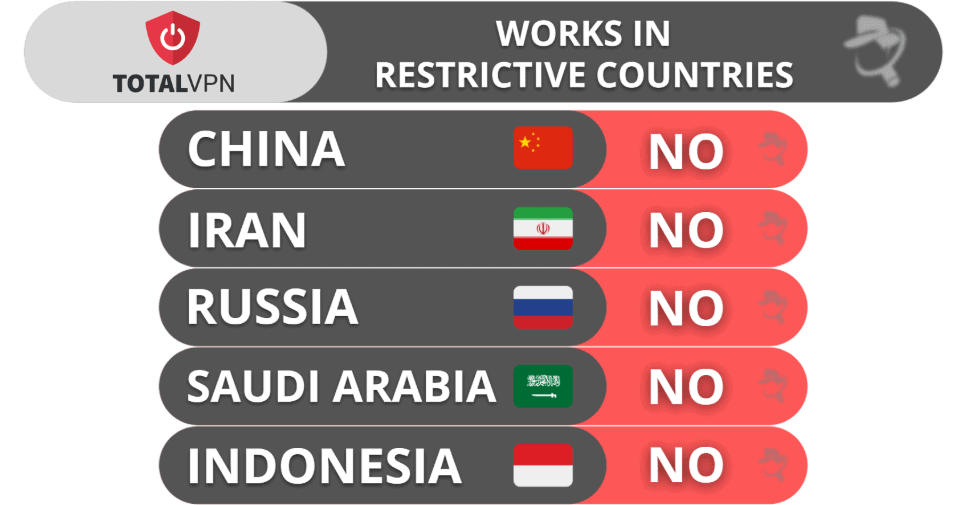
TotalAV’s VPN doesn’t have obfuscation tools. This means it doesn’t work in restrictive countries, such as China, Saudi Arabia, or Iran. The provider’s support reps also confirmed the VPN doesn’t work in those regions. If you’re looking to bypass censorship, I recommend getting ExpressVPN instead.
Total VPN Ease of Use: Mobile & Desktop Apps — Sleek Apps for Desktop & Mobile
TotalAV’s VPN has user-friendly apps for Android, iOS, Windows, macOS, and Apple TV. That’s good, but other top VPNs also have apps for more platforms, including Linux, browser extensions, and Android TV.
Downloading and installing its apps is quick and easy. I got it set up on my devices in just a couple of minutes. Though if you’re purchasing it through an antivirus bundle, it will take a little bit longer (but still less than 5 minutes).
How to Install Total VPN (Just 3 Simple Steps):
- Sign up for TotalAV. The VPN is available as a standalone product or as part of the TotalAV subscription.
- Download and install the apps. Simply follow the on-screen instructions. It will only take about 20-30 seconds for the download to finish.
- Open the VPN app. Log in, pick a server to connect to, click on it, and that’s it! All of your online connections are now secured by the VPN.
Android & iOS — Very Minimalistic (Missing Useful Features)
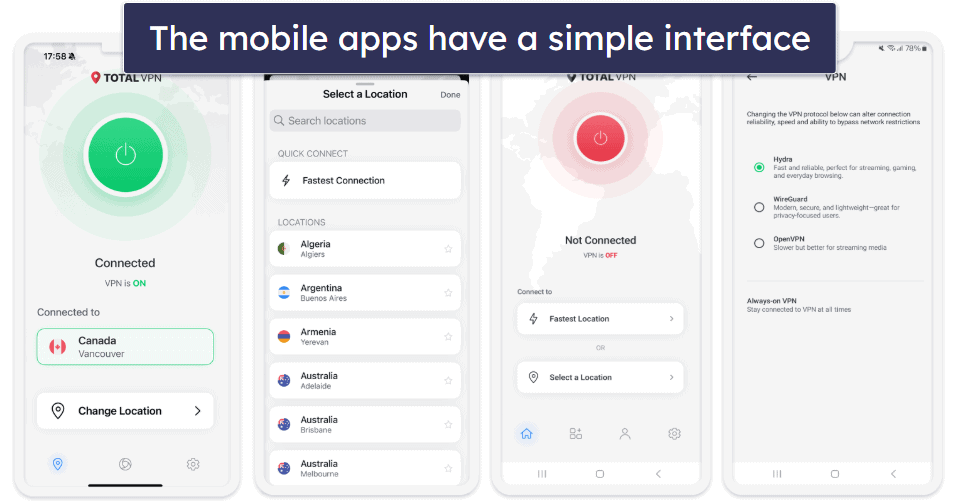
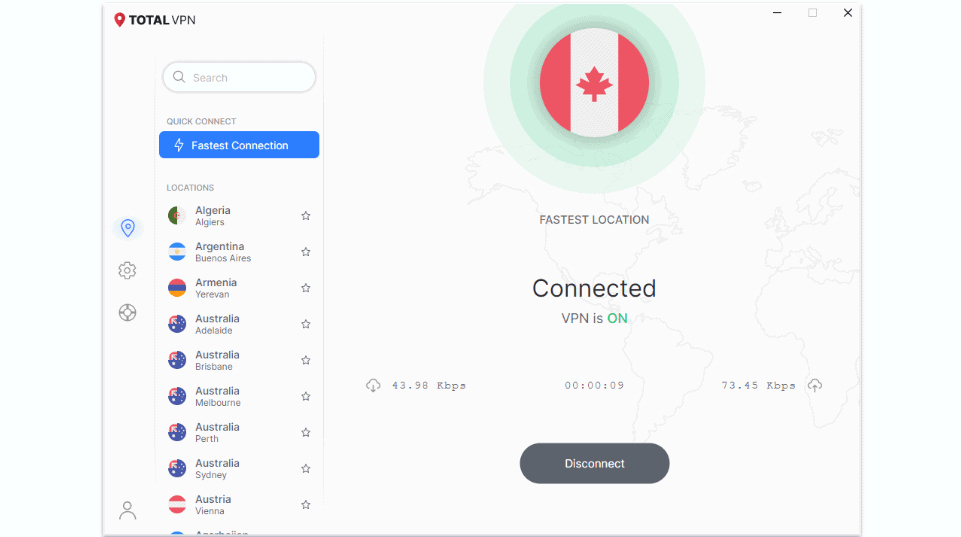
Total VPN’s Android and iOS apps are very minimalistic, so they’re really simple to navigate. I also like that there’s a quick-connect option (called Fastest Location), which connects you to the fastest server based on your location.
Unfortunately, the server selection menu lacks useful features and information. For example, it doesn’t display the latency (how long it takes for your data to travel to the server) next to each server, like Private Internet Access does, or the server load (how overcrowded the server is), like Proton VPN. But I like that you can add favorite locations for quick access, like ExpressVPN.
You can also change your protocol on both apps. Android has Hydra, WireGuard, and OpenVPN, while iOS has Hydra, WireGuard, and IPSec. Both apps also have split-tunneling. On Android, you can exclude apps from the VPN tunnel, and on iOS, you can exclude or include websites from the VPN tunnel. However, there’s no kill switch.
Overall, I found the provider’s mobile apps to be a little too basic. They’re very clean, which makes them easy to navigate, but I’d like to see TotalAV add a kill switch and provide more customization.
Windows/Mac (Desktop) — Similar to Mobile Apps but a Few Extra Features
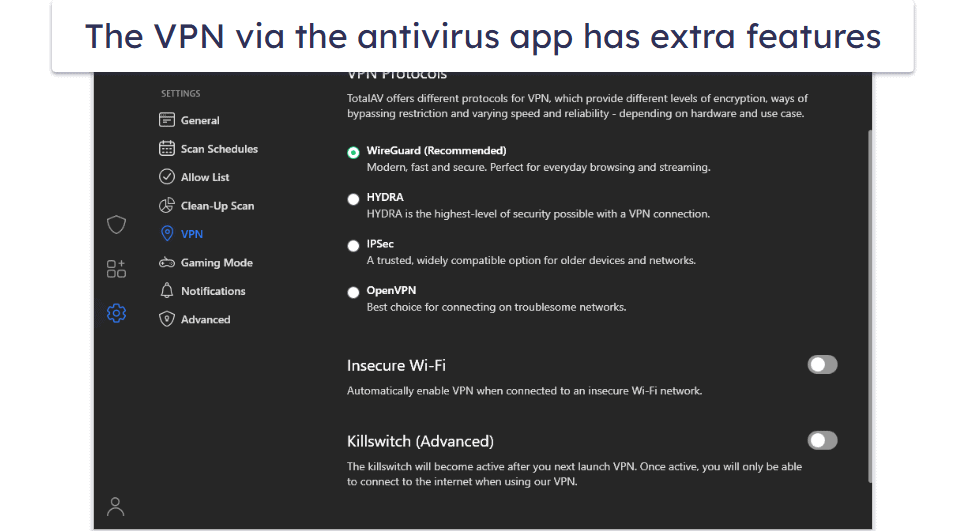
TotalAV’s VPN’s desktop apps are more feature-rich compared to its mobile apps.
The home screen displays more information, including your upload and download speeds (though this doesn’t show on Mac using the antivirus app) and how long you stay connected to a server. I also like the “Connect on Demand” feature that automatically connects the VPN for you, but this is only available on the Mac antivirus app. And like the mobile apps, its server selection menu lets you add favorite servers for easier access.
If you’re using the antivirus app to control the VPN, you can also set it to automatically connect if it detects that you’re on an unsecure Wi-Fi network (toggle on Insecure Wi-Fi), and there’s an advanced kill switch (blocks your entire internet connection unless the VPN is connected).
Overall, I like TotalAV’s VPN desktop apps a bit more than its mobile apps (especially the VPN controls via the antivirus app). Still, the desktop apps are much more basic than other top VPNs’ desktop apps, and it would be nice if all versions of the desktop apps had the same features.
Total VPN Apps: Is Total VPN Easy to Use?
TotalAV’s VPN apps are all quite basic compared to the apps of other top providers. They’re simple, but that also means they’re very lacking in features.
I like Total VPN’s desktop apps better than the mobile apps since they include more features. Unlike its mobile apps, you can set the VPN to connect automatically when it detects that you’re on an unsecure Wi-Fi network, and see connection details on the home screen, such as your download and upload speeds and the duration of your connection.
Total VPN Customer Support — There’s Room for Improvement
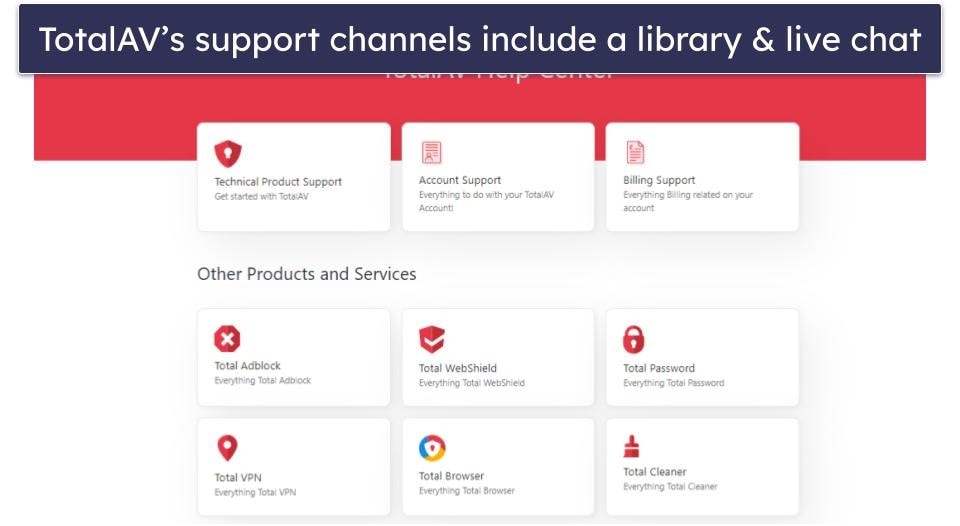
TotalAV’s website has a support library that includes setup and troubleshooting guides. The articles in the support library are decent, with many screenshots to make them easier to follow. But I would’ve liked to see some video guides like ExpressVPN has. I also would’ve liked a search option to make it easier to find the answers you’re looking for — Private Internet Access’s support center has a search option.
When you visit TotalAV’s contact page, it takes you through a series of steps to narrow down your inquiry. While I don’t mind this even if it is a bit time-consuming, I really don’t like that it asks you to confirm your postcode, which you don’t even give when you sign up for an account. I bypassed it by entering “NA”, but this is an invasion of privacy and should not be necessary to submit the ticket.
The only other support channel TotalAV offers is a live chat feature, but it’s not easy to find. There’s no link to its contact page from its support library, and clicking Contact Us at the bottom of its home page just takes you to the support library. The only way I found to access its live chat feature is to visit help.totalav.com/en/contact directly.
Live chat is accessible only if you’ve already bought a TotalAV product. Basically, there isn’t a straightforward way to inquire about the product prior to your purchase, which is less than ideal.
I wasn’t very impressed with the live chat feature when I finally got to it either. It took approximately 3 minutes to get in touch with a support rep, there were long delays between each response in the conversation, and I had to wait almost 10 minutes before the support rep was able to find an answer to one of my basic questions. The other question I asked remained unanswered, as the support rep didn’t appear to understand what I meant and gave me an irrelevant response. To be honest, ExpressVPN and CyberGhost VPN provide much better live chat support.
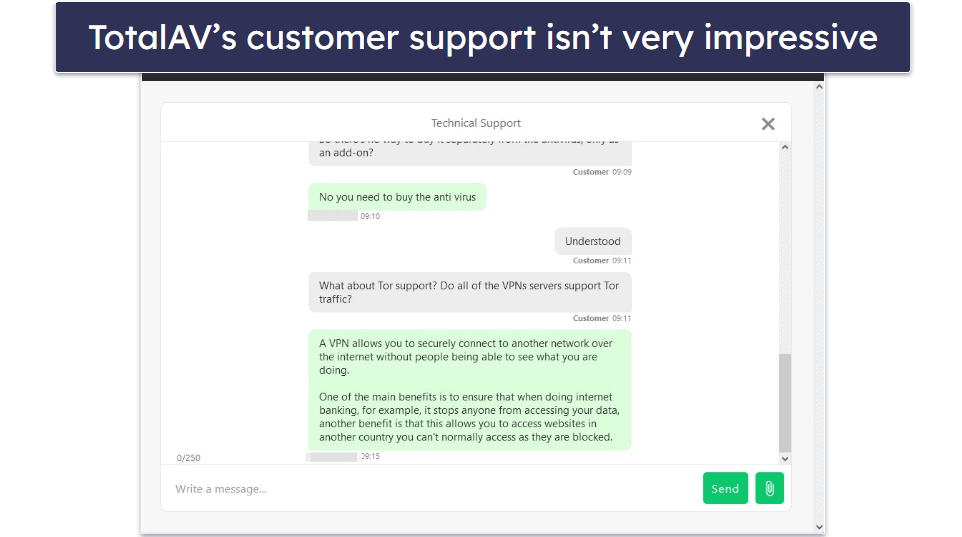
Overall, I’m not happy with TotalAV’s customer support. Its support library isn’t too bad, but it’s very hard to find its live chat feature, and the support reps are neither very responsive nor very knowledgeable. Additionally, it doesn’t provide email support, like most other VPNs.
Is it Worth Getting Total VPN?
Total VPN is pretty fast and has good streaming support — it works with Netflix, Amazon Prime, Disney+, and other major streaming sites. It also has industry-standard security features, including 256-bit AES encryption, a no-logs policy, and a kill switch (Windows only). What’s more, it also comes with full leak protection.
While it’s a good VPN, it still has a few drawbacks — its apps are very basic and its customer support isn’t very helpful.
Total VPN is affordable and includes a year of TotalAV antivirus and ad blocker for one year. It also comes bundled with TotalAV’s antivirus in its Internet Security and Total Security packages instead, which are both affordable. All plans are backed by a 30-day money-back guarantee.
Frequently Asked Questions
Does TotalAV have a VPN?
Yes, Total VPN is included in its Internet Security and Total Security plans, alongside its excellent antivirus, and it’s available as a standalone product as well.
But there are many better standalone VPNs out there. I recommend ExpressVPN. It’s the fastest VPN on the market, has much stronger privacy and security features than Total VPN, and is better for streaming, torrenting, bypassing censorship, and more.
Is Total VPN good for streaming?
Yes, as it works with most major streaming sites, including Netflix, Amazon, Prime, and Disney+, and offers decent speeds. But there are much better VPNs for streaming out there, such as ExpressVPN, which works with 100+ streaming services, including 10+ Netflix libraries).
Is Total VPN free?
No, TotalAV’s antivirus has a free plan, but it doesn’t include its VPN. To get Total VPN, you have to purchase it on its own or as part of TotalAV’s antivirus bundles: TotalAV Internet Security or TotalAV Total Security. TotalAV Internet Security includes TotalAV’s antivirus and VPN and TotalAV Total Security also adds a password manager.
Is Total VPN safe?
Yes, TotalAV has a pretty secure VPN. It uses 256-bit AES encryption, offers very secure protocols including WireGuard, provides DNS, IPv6, and WebRTC leak protection, and has a kill switch and a no-logs policy.
Editor's Note: ExpressVPN and this site are in the same ownership group.